Welcome to my blog.
Download some really cool game pics along with some of the most useful tips and tricks for your pc........and BE MY FOLLOWER....
PC Customization.
Tired of getting same old default look from your PC, well now you can customize it with a little help from my customization section and start tweaking it.
Contact Us.
If you have any questions or complain regarding the posts of this blog or have some advise then please e.mail it at shehanabid@gmail.com. Thanks.
Tuesday, 18 October 2011
How to Apply Skins in GTA Vice city and GTA 3
Apply custom skins in vice city.
Download skins from net and put them in the “skins” folder which is located in your gta folder if it is not there create one for your self. And open the game go to “options”. And “player skins” and select any one. And you are done. This method can also be done with Gta 3 .Enjoy…..
Monday, 17 October 2011
GTA Vice City Tips and Tricks
Vice City
How to get Money Easiest way.
Way 1
Enter “PANZER” to spawn a tank or find any police vehicle. Start the vigilance mission and get out of the tank and then enter “BIGBANG” to blow all vehicle. Your tank will be blown too with the vehicle you are said to destroy and your mission will be completed. So, again enter “PANZER” to spawn another tank get in it and your time will be restarted so you can do the whole process again. The more times you do this the more money you will get.
Way 2
Enter “PANZER” to spawn a tank or find any police vehicle. Start the vigilance mission and get out of your vehicle but before entering bigbang store your vehicle in one of your safe house garage and then enter “BIGBANG” to blow all vehicles. Your vehicle will not be blown but the vehicle you are said to destroy will be destroyed and your mission will be completed. So, you don’t have to enter “PANZER” to spawn another tank all you have to do is enter in the vehicle which you have store in your garage and your time will be restarted so you can do the whole process again with same vehicle in less time. The more times you do this the more money you will get.
How fly as high as you want in vehicle.
You are going to need a tank. You can spawn it by entering “PANZER”. And find a straight road (like airport runway or ocean beach). Now once you are inside tank turn your turret backward. So, as you fire your tank fire backwards and you gain speed keep firing backwards until you have enough speed. Once you think that you’ve got enough speed enter “COMEFLYWITHME” as a result your tank will start flying. But don’t stop firing. Keep firing for more speed and height. In this way you can gain as much height as you want. Enjoy…..
GTA VICE CITY Cheat codes.
Vice City Cheat Codes
Start the game and type any one of these cheats when playing the game or while the game is paused.
Weapons and Health
THUGSTOOLS Weapon set 1
PROFESSIONALTOOLS Weapon set 2
NUTTERTOOLS Weapon set 3
PRECIOUSPROTECTION Max Amour
ASPIRINE Max Health
Police and wanted levels
YOUWONTTAKEMEALIVE Raise wanted level by 2 stars
LEAVEMEALONE Reset Wanted Level
CHASESTAT Show media level status
Weather
APLEASANTDAY Partly Cloudy Weather
ALOVELYDAY Sunny Weather
ABITDRIEG Cloudy Foggy Weather
CATSANDDOGS Stormy Weather
CANTSEEATHING Foggy Weather
Vehicles / Cars
LIFEISPASSINGMEBY Speed up Clock of game (Time)
BIGBANG Blow Up all cars
WHEELSAREALLINEED Invisible Cars
COMEFLYWITHME Cars can fly
GRIPISEVERYTHING Improve Car handling
GREENLIGHT Every signal light is green
MIAMITRAFFIC Aggressive Drivers everywhere
AHAIRDRESSERSCAR All cars turn into pink color
IWANTITPAINTEDBLACK All cars turn into black color
TRAVELINSTYLE Spawn Bloodring Banger
THELASTRIDE Spawn
ROCKANDROLLCAR Spawn lovefist
RUBBISHCAR Spawn Trashmaster
GETTHEREFAST spawn Sabre Turbo
BETTERTHANWALKING Spawn Cabbie
GETTHEREQUICKLY Spawn Bloodring Banger 2
GETTHEREVERYFASTINDEED Spawn Hotring Racer
GETTHEREAMAZINGLYFAST Spawn Hotring Racer 2
PANZER Spawn Tank (Rhino)
SEAWAYS Cars can float over water
LOADSOFLITTLETHINGS Sports cars have big wheels
HOPINGIRL Girls get in your cars
AIRSHIP Boats can fly
Player and GameplayCheats
LIFEISPASSINGMEBY Speed up Clock of game (Time)
STILLLIKEDRESSINGUP Change Clothes
FIGHTFIGHTFIGHT Every body starts Fighting
LIFEISPASSINGMEBY Speed up Clock of game (Time)
NOBODYLIKESME Everybody start hitting you
OURGODGIVENRIGHTTOBEARARMS Everybody Has Arms
ONSPEED Speed up Gameplay
BOOOOOORING Slow Down Gameplay
CHICKSWITHGUNS Girls Carry Guns
ICANTTAKEITANYMORE Commit suicide, Instant Death
LOOKLIKELANCE Turns your Player into Lance
MYSONISALAWYER Turns your Player into Ken rosnberg
ILOOKLIKEHILARY Turns your player into Hilary
ROCKANDROLLMAN Turns your player into Lovefist char.
ONEARMEDBANDIT Turns your player into Phil Cassidy
IDONTHAVETHEMONEYSONNY Turns your player into Sonny
FOXYLITTLETHING Turns your player into Mercedes
WELOVEOURDICK Turns your player into Love fist 2
CHEATSHAVEBEENCRACKED Turns your player into Diaz
DEEPFRIEDMARSBARS Turns your player Fat
PROGRAMMER Turns your player thin
FANNYMAGNET Girls start coming towards you
CERTAINDEATH player starts smoking
Saturday, 1 October 2011
How to Change folder background image in win xp. Easiest way.
First open "Notepad".
Then type the following lines in it. Just copy it from here.
[ExtShellFolderViews]
{BE098140-A513-11D0-A3A4-00C04FD706EC}={BE098140-A513-11D0-A3A4-00C04FD706EC}
[{BE098140-A513-11D0-A3A4-00C04FD706EC}]
IconArea_Image=
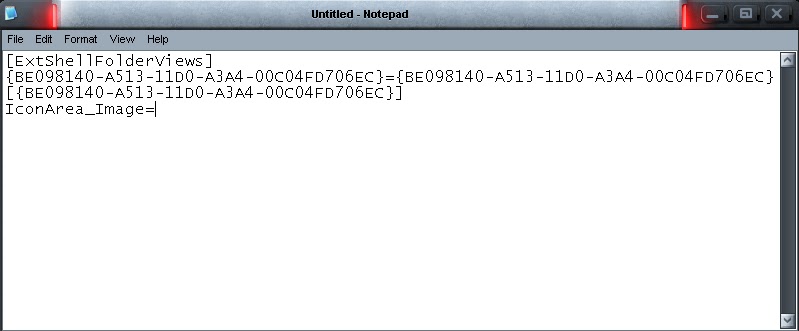
It will look something like this.
Then after "IconArea_Image=" type the full path of the image you want to use as your background.
For example:
I want to use a image which is in "D:\SH3H@N\MOBILE\Walpaper\Night scene.jpg"
So i will write:
Then type the following lines in it. Just copy it from here.
[ExtShellFolderViews]
{BE098140-A513-11D0-A3A4-00C04FD706EC}={BE098140-A513-11D0-A3A4-00C04FD706EC}
[{BE098140-A513-11D0-A3A4-00C04FD706EC}]
IconArea_Image=
It will look something like this.
Then after "IconArea_Image=" type the full path of the image you want to use as your background.
For example:
I want to use a image which is in "D:\SH3H@N\MOBILE\Walpaper\Night scene.jpg"
So i will write:
[ExtShellFolderViews]
{BE098140-A513-11D0-A3A4-00C04FD706EC}={BE098140-A513-11D0-A3A4-00C04FD706EC}
[{BE098140-A513-11D0-A3A4-00C04FD706EC}]
IconArea_Image=D:\SH3H@N\MOBILE\Walpaper\Night scene.jpg
Note that extensions (.jpg, .bmp, .png) is important and background image will not change until you write proper extension along with proper path and file name
After that save it in the folder in which you want to change background as "desktop.ini"
Now change the icon of the folder in which you have saved the "desktop.ini" file (right click on the folder then go to customize tab and select "Change icon. in case you don't know)
you can select any icon of your choice.
After you have done so go into the folder and see the background image.
Have fun...
Thursday, 11 August 2011
How to Apply Cool themes in your windows XP.
When you surf on the internet you find lots of cool themes for your pc. But when you download it and apply it instead of the theme you get Classic windows xp theme. Now I am going to tell you how you can apply themes on your computer.
Firstly, you are going to need a patch known as uxtheme multi-patcher. you can download it by clicking here.
When you have downloaded it.
Open it (2x click) and you will see a dialog box like this.
Firstly, you are going to need a patch known as uxtheme multi-patcher. you can download it by clicking here.
When you have downloaded it.
Open it (2x click) and you will see a dialog box like this.
you have to click on "Run".
A dialog box will appear like this
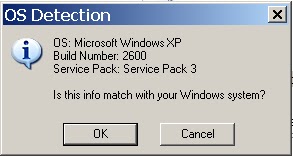
Click on "patch" Then one more dialog box will appear detecting your operating system.If the Operating system, Build Number and service pack is same as your PC then click on OK.
You will be asked to wait about one minute while you are waiting do not insert your windows XP cd in your computer. You will be asked to insert your XP CD but don't do it and click on cancel.
then another dialog box will appear asking for Restart.
Click on OK to restart your PC and you are done. now you can download and apply any windows XP theme on your PC.
You can search on Google or here are some cool sites where you can download XP themes for free.